
Playing Chicken Ways on a Phone
Chicken Ways is laid out like a phone screen even on a desktop: the board up top, Cash Out in the middle, the arrows under your thumb.
Same board, same odds on every screen size. The cash-out math doesn't care what device you're on.
Built Portrait-First
Open the game on a laptop and you'll notice it plays in a tall column with dark margins on each side. That's the phone layout, and on an actual phone it fills the screen edge to edge. SmartSoft's own page calls its games responsive across phone, tablet and desktop, and this one feels designed for one-handed portrait play first.
There's nothing to install. The game runs in the browser inside your casino's lobby, so a phone gets the same 169-tile board, the same 97.00% return and the same 10,000x ceiling as a desktop.
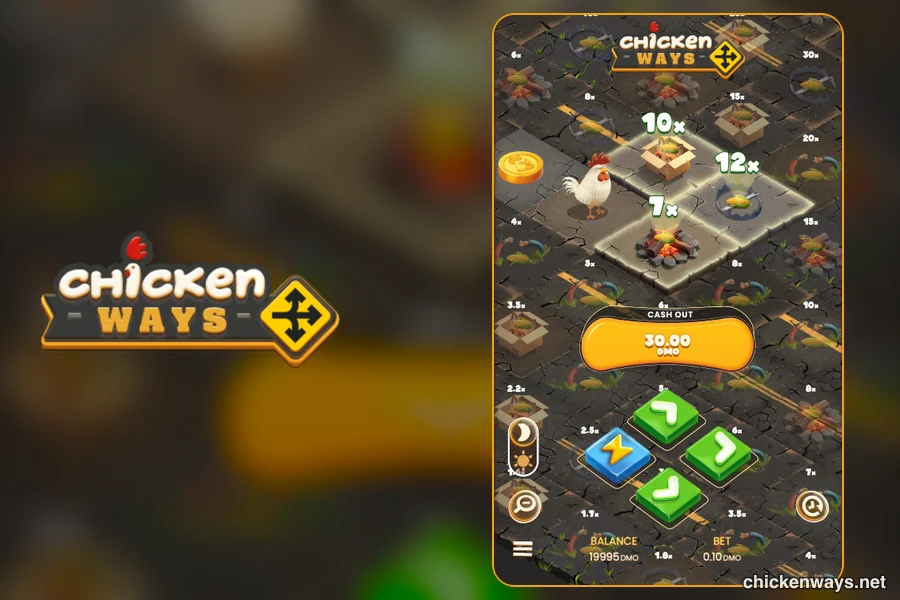
Where Everything Sits
| Part | Position | What you see |
|---|---|---|
| Board | Top two-thirds | The chicken, the three tiles you can jump to (their multipliers shown big), and the rest of the board in small print around them. |
| Cash Out | Centre | An orange button showing stake × current tile. Before the first jump this space shows the bet selector with − and + instead. |
| Arrows | Bottom centre | Three green arrow tiles for right, up and diagonal, plus a blue lightning tile for Turbo. |
| Side controls | Left and right edges | Sun/moon switch for light or dark board, a magnifier for Zoom, the burger menu, and a clock icon for history. |
| Balance and bet | Bottom strip | Your balance and the current stake. |
Four Taps to Know
Choose a stake
Tap − or + until the stake you want shows (0.10 to 1,000 in the demo).
Jump
Tap an arrow, or tap one of the highlighted tiles directly. The first tap also places the bet.
Cash Out
Tap the orange button. It shows exactly what you will receive.
See the whole board
Tap the magnifier to zoom out, tap again to zoom back to the chicken.
When the Signal Drops
Phones drop signal in lifts and tunnels, so the disconnection rules matter more here than on a desktop. If you lose the connection mid-jump, the jump still resolves and you'll see the result once you're back.
If you just stop touching the screen, the game waits two minutes after your last jump and then cashes out at the tile you're on. Five minutes without any activity ends the session.
Small Fixes for Common Snags
The board looks cramped
Turn the phone upright. The game is built for portrait, and the zoom button shows the full board when you need it.
Taps on tiles miss
Use the arrow buttons at the bottom instead. They do the same thing and they are bigger targets.
No sound
Check the mute switch, then the sound toggle in the burger menu. Mobile browsers also hold back audio until you tap the screen once.
Battery drains fast
Turbo and long sessions keep the animation busy. Shorter sessions are the simplest fix.
Hold It Upright and Try a Round
The demo opens in your phone browser. Nothing to download.
Launch the Demo